
Give Residents and Staff Access to Schedules Online
The MedRez.net Scheduling Tool puts your schedules online for all your residents and staff to see.
With your schedule online on the MedRez.net Schedule Viewer your residents and staff have a single centralized location for their schedules. This reduces occurrences of missed shifts, reduces confusion about which is the latest version of the schedule, and takes a lot of weight off your shoulders when changes to the schedule are made.
The new viewer is amazing. The entire residency program loves it. I've requested funds to buy the spring semester and 2013-2014 year. ”
Online Schedules, Optimized for Smartphones and Tablets
Residents and staff can view schedules whether they are in front of a computer or while they are away on their smartphone, or tablet, including iPhone™, iPad™, Android™ and other devices.
The MedRez.net web-based Schedule Viewer is designed to work on any modern browser.

See Who is On Right Now
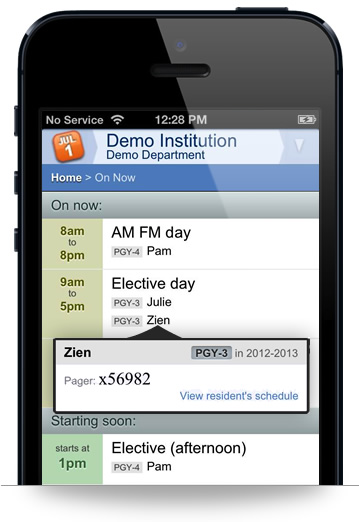
The new "On Now" view shows all ongoing shifts, calls and clinics as well as who is staffing them. Additionally you can see who just finished a shift and who will be starting next.
Resident and staff Pager numbers can be viewed to quickly contact them.
View Your Personal Schedule

Each resident and staff can click through to their own page showing their current schedule. From there they can print, export, and synchronize their schedule with their personal calendar application.
Residents and staff can keep their personal calendars up to date with their MedRez.net Call and Shift schedule thanks to a personalized calendar feed. The personal calendar feed works with most popular calendar software, such as Microsoft Outlook™ , Apple's iCalendar™ and the calendar on iOS devices.
Export and Print Schedules
Call and shift schedules can be exported in standard calendar formats so that they can be imported into calendar applications like Outlook™ Apple's iCalendar and Google Calendar.
In addition schedules can be exported to PDF format which is ideal for printing and emailing.
Gathering Day-off Requests Online is Painless
Residents and staff can enter their day-off and vacation requests online.
This feature saves you the trouble of keeping track of requests that get emailed, left on voicemail, and mentioned in passing. If a paper form based system is currently in use, switching to MedRez.net means all data-entry is done for you.
The MedRez.net Scheduling Tool's powerful request tallying system lets you keep separate tallies of vacation requests, day-off requests, paternity/maternity leave, educational leave, or any other category.
Multiple Options For Finding Schedules Online
The MedRez.net Scheduling Tool offers options that empower you to keep your schedules secure and private, while making it convenient for your residents and staff to access them.
Once published, schedules can be accessed through a special web address. You can email, bookmark, and create a link to this address on your department website.
In addition you can optionally allow residents and staff to find your schedules by using the search box on the MedRez.net home page. See below:

Publishing Schedules Online Is a One-Click Operation
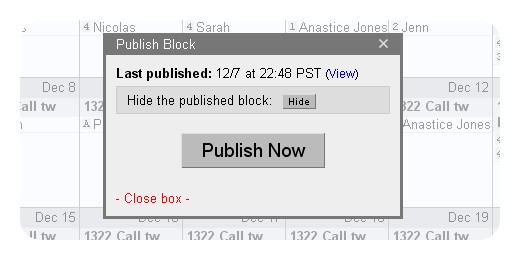
Putting an entire schedule online along with its tallies is as simple as it gets. Just bring up the Publish box and click "Publish Now".
Two seconds later your schedule is online.

The Scheduling Tool is enhanced with new features on a regular basis. Stay up to date by signing up for MedRez.net's occasional emails.