
ACGME Duty Hour Rules Checking
The MedRez.net Scheduling Tool for medical residencies is the only program that checks for duty hour violations before you add a resident to a call or shift.
It is like having a virtual assistant point out all the potential duty hour violations as you make your schedule.
Customizable Duty Hour Rules
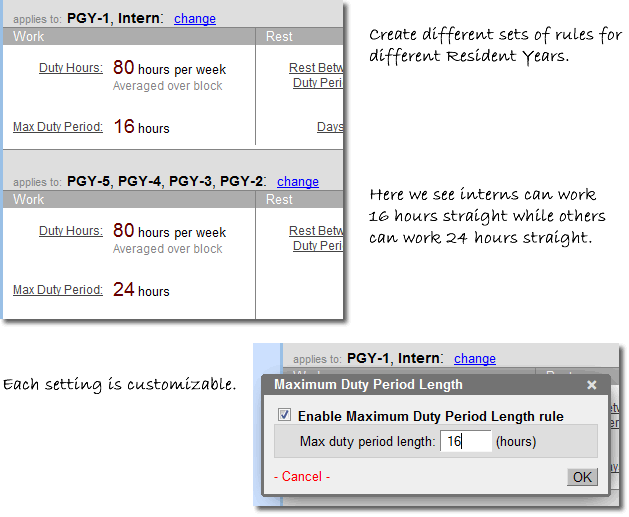
The Duty Hour Rule system is highly customizable. Different specialties require different settings and all residency programs have their own special needs. For this reason each rule's parameters can be changed individually.
In addition you can set different rules for different resident years and Staff Levels. For example you might specify that an intern must not work more than 16 consecutive hours while a more advanced resident can do 24 hours of continuous duty.
How Does It Work?
Every time you add a resident to a shift or call, the program recalculates the number of duty hours, the number of days off, the call frequency, and more for that resident. The results are displayed in the Stats Table (see below).

The program also determines which calls would cause that resident to be in violation of duty hour rules. Below, the program shows that "Sarah K" should not be added to the call on Oct 2 and the daytime shift and short call of Oct 4 by leaving these times greyed out.

The program gives explanations for the potential violations when you put the mouse over the '+' sign for each call, as shown below.

If you put a resident on call when it violates an ACGME rule the program will highlight the error in red and provide an explanation of the violation (see below).

Summary of Duty Hour Rules
The five main rules mandated by the ACGME are integrated into the program. See the list below for details.
For official rule language you are refered to the ACGME's website (link opens a new window).
Duty Hours per Week
The program keeps track of duty hours scheduled for each resident. It displays the number of duty hours per week, and gives warnings when the number of hours is about to exceed the preset maximum for that resident when averaged over the block.
Rest Between Duty Periods
The program verifies that there is an adequate gap between each day's duty periods. This rest period can be set to any number but is usually 10 hours. The program can also make the rest period at least equivalent to the previous duty period length, and the rest period can be increased when it follows a 24-hour duty period, as required by the ACGME.
Mandatory Days Off
The program counts all occurrences where residents have 24 hours free of all clinical responsibilities on the schedule. "Days off" can be made to count only if they give the resident a full day's rest.
Call Frequency and Minimum Spacing
The program keeps track of each resident's calls for the block and displays the total. In addition you can specify a minimum spacing between calls (such as Q-3) to ensure schedules are in full compliance.
Maximum Continuous Duty
Set the maximum number of hours a resident can work continuously.
Please Note: The ACGME has a policy of not endorsing software that helps residencies comply with their rules. H2-O2's MedRez.net Scheduling Tool is not endorsed by the ACGME. Compliance with the ACGME's rules is the responsibility of the residency regardless of which program is used. Details on the ACGME's non-endorsement policy are available here (link opens a new window).